
Google announced new feature, “Confidential mode” back in April this year for the users for enhanced security of their sensitive information that they email to their contacts. Google rolled out the feature for desktop only at that time.
On Thursday Google announced in a post on Twitter that Gmail’s confidential mode has been rolled out to mobile devices.
Google explains how the feature works on its support page,
Google explains how the feature works on its support page,
“You can use confidential mode to set an expiration date for messages or revoke access at any time. Recipients of the confidential message will have options to forward, copy, print, and download disabled.”
Here’s how you can send sensitive information to your contacts using gmail:
- Compose a message
- Tap on Confidential mode located at the bottom right corner
- A small window will open providing you options to set an expiration date and passcode for the email
- Click save
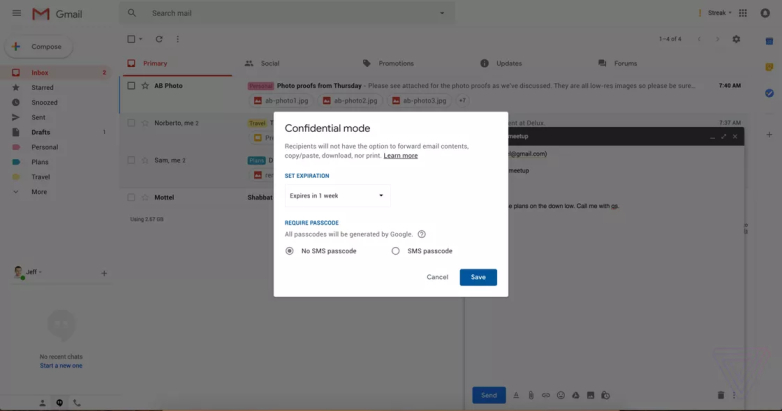
Now you can set the passcode and only when the recipient enters the code that he recieves in an SMS on their phone can they open and check the email.
There are many times when not just businesses but also other users need to send their Passport copies or other credentials. This is critical that they make sure that the email expires after a certain date and has high security so, no one else can open the email. So, this confidential mode feature is particularly helpful to businesses but also quite useful to others.
Back in April, Gmail also underwent a significant design overhaul. Snooze and Smart Reply were among those features that were introduced in the Gmail redesign.
Comments
Post a Comment